In the freelancing world, managing your payments efficiently is crucial for running a successful business. One of the most important tools in a freelancer’s toolkit is a freelancer invoice. Whether you are a designer, developer, writer, or consultant, a clear and professional invoice can help you get paid faster and avoid confusion with clients.
In this guide, we will discuss everything about freelancer invoices, share a ready-to-use freelance invoice template, and show how MyBillZone can make invoicing simple and professional.

What is a Freelancer Invoice?
A freelancer invoice is a document sent by freelancers to clients requesting payment for services rendered. It serves as a record of work completed, ensuring clarity between the freelancer and the client.
A freelancer invoice typically contains:
- Freelancer’s name, business name, and contact details
- Client’s name and contact details
- Description of services provided
- Date of service and invoice issue
- Amount due and payment terms
- Taxes, if applicable
Sending professional invoices is not just about requesting payment—it’s about building trust and credibility with your clients.
Why Every Freelancer Needs a Freelance Invoice Template
Many freelancers make the mistake of sending casual emails or messages for payment. While this might work for small gigs, it can lead to delays and misunderstandings. Using a freelance invoice template has several advantages:
- Professional Appearance – A well-designed invoice reflects your professionalism and creates trust with clients.
- Accuracy in Billing – Avoid mistakes in calculations or missing information.
- Time-Saving – Reuse templates for recurring clients and save hours of work.
- Easy Tracking – Quickly track paid, pending, and overdue invoices.
- Legal Documentation – Invoices act as proof of work and payment in case of disputes.

Key Elements of a Freelancer Invoice
To make a freelancer invoice effective, ensure it includes the following elements:
1. Invoice Number
Every invoice should have a unique number. This helps you organize and track invoices easily. For example, you can use a format like INV-2025-001.
2. Freelancer & Client Details
Include full contact information of both parties:
- Name
- Phone number
- Business address
3. Description of Services
Be specific about the work you have done. Include:
- Service title (e.g., Website Design, Logo Creation)
- Hours worked or project milestones
- Rate (hourly or fixed)
4. Rates and Total Amount
Clearly mention your rates and calculate the total amount. Include:
- Hourly rate x number of hours
- Fixed project cost
- Taxes, if applicable (e.g., GST)

5. Payment Terms
Define payment terms clearly:
- Payment due date (e.g., within 15 days)
- Accepted payment methods (Bank transfer, UPI, PayPal, etc.)
- Late fees (optional, for overdue payments)
6. Taxes and Legal Compliance
Depending on your country, mention applicable taxes such as GST. A MyBillZone invoice allows you to add HSN codes and GST easily, making your invoices compliant with Indian tax laws.
Free Freelance Invoice Template You Can Use
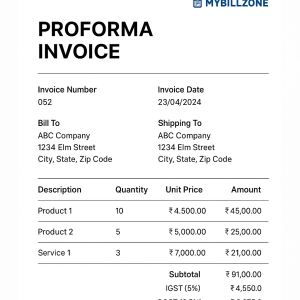
Starting freelancers often struggle with invoice creation. To make life easier, here’s a free freelance invoice template you can use:
| Invoice No | Date | Due Date |
|---|---|---|
| INV-001 | 15-Dec-2025 | 30-Dec-2025 |
| Description | Hours/Qty | Rate | Amount |
|---|---|---|---|
| Web Design | 20 hours | ₹500/hr | ₹10,000 |
| Logo Design | 1 piece | ₹2,000 | ₹2,000 |
Subtotal: ₹12,000
GST (18%): ₹2,160
Total: ₹14,160
This is just an example. You can customize it in MyBillZone with your branding, logo, and colors.
How to Create a Freelancer Invoice with MyBillZone
Creating invoices with MyBillZone is simple and saves a lot of time:
- Sign Up for Free: Go to MyBillZone and register an account.
- Choose a Template: Select a professional freelance invoice template from the library.
- Add Client Details: Fill in your client’s name, address, and email.
- Add Services: Enter your services, quantity, rate, and any applicable taxes.
- Preview Invoice: Check for accuracy and ensure all details are correct.
- Send Invoice: Download as PDF or email directly to your client from MyBillZone.
With MyBillZone, you can also track which invoices are paid, pending, or overdue.
Tips for Making Your Freelance Invoice Stand Out
- Add Your Logo: Branding adds professionalism and builds trust.
- Include a Thank-You Note: A small message like “Thank you for your business” makes a positive impression.
- Clearly Mention Payment Due Date: Avoid delays by stating the due date prominently.
- Keep Records: Maintain a copy of all invoices for accounting and tax purposes.
- Consistent Formatting: Use the same template style for all invoices to look professional.
Mistakes to Avoid in Freelance Invoicing
- Sending invoices without proper details
- Forgetting to include taxes or GST
- Not specifying payment terms clearly
- Using informal emails instead of professional invoices
By using a freelance invoice template on MyBillZone, you can avoid all these common mistakes.
Conclusion
A well-prepared freelancer invoice is not just a request for payment—it’s a tool to maintain professionalism, build client trust, and streamline your freelance business.
Using MyBillZone, freelancers can:
- Create invoices quickly
- Customize templates for branding
- Include taxes like GST easily
- Track payments efficiently
Start using MyBillZone today to make your freelancing journey smoother and more professional.