Creating a GST invoice that follows India’s GST rules can be confusing for many small businesses. That’s why thousands of businesses search online every month for “online GST bill format” to download ready-made templates or generate bills instantly.
In this blog, we will give you everything you need—the correct GST bill format, free templates, required fields, examples, and a simple way to create GST bills online using MyBillZone.
If you want your GST billing process to be fast, accurate, and professional, this guide is for you.
✔ What Is an Online GST Bill Format?
An online GST bill format is a ready-made layout used to generate GST invoices digitally.
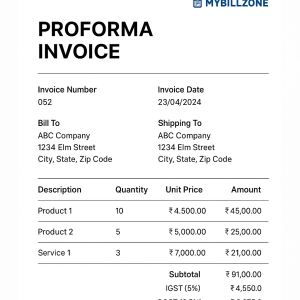
It includes all mandatory GST fields such as:
- Invoice number
- Date
- Seller & buyer details
- GSTIN
- HSN/SAC code
- Taxable value
- CGST, SGST, IGST
- Total invoice amount
Using an online format ensures:
- Correct calculations
- 100% GST compliance
- Professional looking invoices
- Time-saving automation
✔ Who Needs a GST Bill Format Online?
You need an online GST invoice format if you are:
- A small business owner
- Freelancer
- Retail shop owner
- Service provider
- E-commerce seller
- Trader or wholesaler
- Manufacturing business
If you charge GST, then creating bills using a compliant format is mandatory.
1️⃣ B2B GST Invoice Format (Business to Business)
Used when selling products/services to GST-registered businesses.
Must include:
- Buyer GSTIN
- Place of supply
- HSN/SAC
- Tax breakup (CGST/SGST/IGST)
2️⃣ B2C GST Invoice Format (Business to Consumer)
Used when buyer is not registered under GST.
Includes:
- Seller GSTIN only
- Customer details (optional)
- GST tax breakdown
3️⃣ Export Invoice Format
Special rules apply here:
Special rules apply here:
- Must include “Export under LUT/Bond” or “Export with IGST”
- Currency mention is mandatory (USD, EUR etc.)
- No CGST/SGST—only IGST applies
4️⃣ Reverse Charge Invoice
If GST is payable by the buyer instead of the seller, mark the invoice with:
“Tax payable on reverse charge basis”
5️⃣ GST Bill of Supply Format
Used when:
- GST is not applicable
- Seller is registered under Composition Scheme
Must include:
- “Bill of Supply” title
- GSTIN (if registered)
- No tax values
✔ Mandatory Fields in a GST Invoice (As Per GST Rules)
Your GST bill must include:
🔹 Invoice Number
Unique, consecutive invoice reference.
🔹 Invoice Date
Billing date.
🔹 Seller Details
- Name
- Address
- GSTIN
🔹 Buyer Details
- Name
- Address
- GSTIN (for B2B)
🔹 HSN/SAC Code
Product or service classification.
🔹 Item Details
- Quantity
- Price
- Discount
- Taxable value
🔹 GST Breakdown
- CGST
- SGST/UTGST
- IGST
🔹 Total Amount
Grand total after tax.
🔹 Signature
Digital or scanned signature accepted.
Free Download: GST Bill Formats (Excel, PDF, Word, Images)
You can create GST bills using our ready-made templates:
✔ GST Invoice Format in Excel
✔ GST Invoice Format in Word
✔ GST Invoice Format in PDF
✔ GST Bill Format for Services
✔ GST Bill Format for Products
✔ B2B / B2C / Export Templates
(You can use these templates inside MyBillZone for free.)
Why MyBillZone Is the Best Online GST Bill Generator
MyBillZone makes GST billing simple, fast, and accurate.
⭐ Key Features:
- Create GST bills in 10 seconds
- Auto tax calculation
- Print or download in PDF
- Save customer & product details
- Generate unlimited invoices
- Multi-GST support
- Professional templates
- Works on mobile & laptop
Why Businesses Love MyBillZone
- No complicated software
- Clean & modern design
- Free GST compliant templates
- Safely stores all invoice data
How to Create an Online GST Bill Using MyBillZone
Follow these simple steps:
Step 1: Open MyBillZone GST Invoice Generator
Step 2: Enter business & customer details
Step 3: Add items with tax percentages
Step 4: Preview the invoice
Step 5: Download or print as PDF
Your GST bill is ready!